Cabin Cross Check: We’re Beginning Our Descent

Hello everyone🙌
It’s been a while since my last article. I’ve been busy working on several projects — and, to be honest, the summer heat hasn’t exactly helped either! This time, however, I’m excited to dive into a topic that plays a fundamental role in building and managing modern AWS environments.
In this article, we’ll take an in-depth look at AWS Control Tower, one of the most important services for designing large-scale AWS architectures and managing multi-account environments in a secure, consistent, and centralized manner. We’ll also explore how AWS Control Tower aligns with the principles of the AWS Well-Architected Framework, helping organizations establish strong governance, improve security, and achieve operational excellence from the very beginning.
So, if you’re ready, let’s explore the capabilities of AWS Control Tower and discover why it has become the foundation of modern AWS multi-account environments.
1. Introduction — What Is AWS Control Tower?
When you first start using AWS, everything typically lives in a single account. As your environment grows, however, development, testing, and production workloads often end up sharing the same account. At that point, it becomes clear how risky this approach can be — a single misconfigured IAM policy or an accidentally public Amazon S3 bucket can potentially impact the entire environment.
This is why organizations eventually adopt a multi-account architecture, where development, testing, production, and shared services each reside in their own AWS accounts with clear security and operational boundaries.
The challenge is that building and managing this architecture manually is both time-consuming and complex. Creating dozens of AWS accounts, configuring centralized logging, enforcing consistent security policies, establishing identity management, and maintaining governance across every account quickly becomes difficult to manage at scale.
This is exactly where AWS Control Tower comes in.
AWS Control Tower automates the creation of a secure, well-architected multi-account environment by following AWS best practices. In just a few steps, it provisions what AWS calls a Landing Zone — a preconfigured foundation that includes governance, security guardrails, centralized logging, identity management, and account provisioning.
A simple way to think about AWS Control Tower is this:
You provide the building blocks — the AWS accounts — and Control Tower knows how to organize them, apply the appropriate governance, enforce security controls, and ensure they all operate within a consistent framework.
One important point worth mentioning is pricing. AWS Control Tower itself does not incur an additional service charge. You only pay for the AWS services it provisions and manages on your behalf, such as AWS CloudTrail, AWS Config, Amazon S3, Amazon CloudWatch, and other supporting services.
2. Landing Zone Architecture
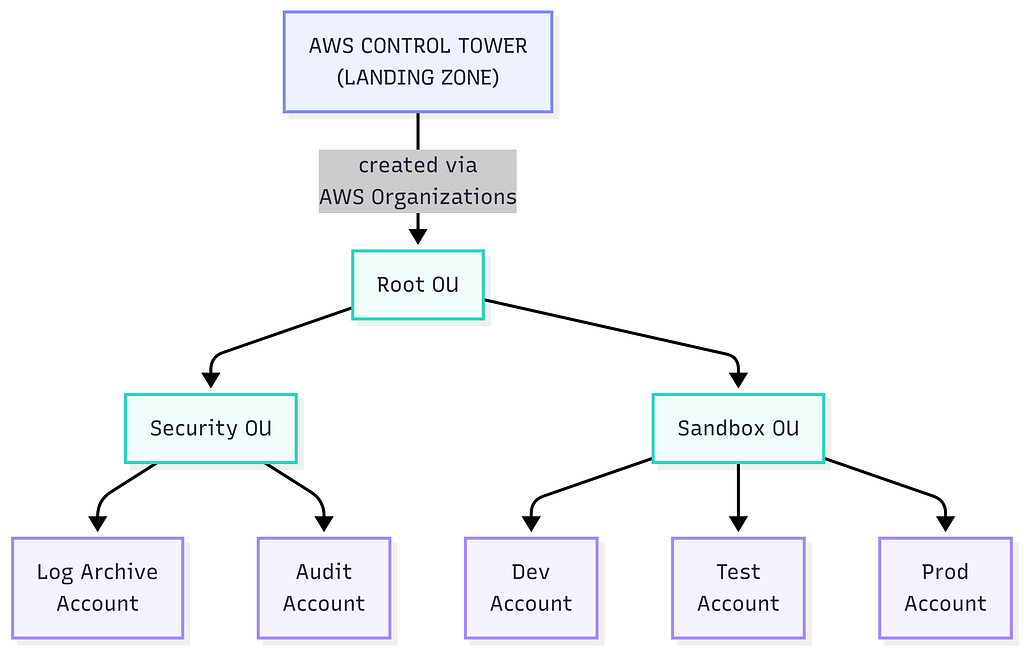
The first thing AWS Control Tower creates is the Landing Zone — the foundational architecture that defines how your AWS accounts are organized and governed. This foundation is built automatically on top of AWS Organizations, using a hierarchical structure of Organizational Units (OUs).
At the top of the hierarchy is the Root OU, which serves as the parent container for the entire AWS organization. Beneath it, AWS Control Tower creates the core Organizational Units that form the foundation of your multi-account environment.
Security OU
The Security OU contains two critical shared accounts:
- Log Archive Account — Acts as the centralized repository for logs collected from all AWS accounts, including AWS CloudTrail and AWS Config. Centralizing logs helps ensure long-term retention, auditing, and forensic analysis.
- Audit Account — Used by security and compliance teams to monitor the entire AWS environment. Through cross-account IAM roles, administrators can securely access member accounts to perform security assessments, investigations, and automated remediation when necessary.
Sandbox OU
The Sandbox OU is where your workload accounts reside, such as Development, Testing, Production, or any other project-specific environments.
One of the biggest advantages of AWS Control Tower is that onboarding new accounts is straightforward. Whenever a new team or project requires its own AWS account, Control Tower automatically enrolls it into the Landing Zone and applies the organization’s governance policies, security controls, and logging configuration without requiring manual setup.
The overall Landing Zone architecture can be summarized with the following diagram:
One of the biggest advantages of this architecture is the clear separation between workloads and security operations.
By isolating logging and auditing from workload accounts, organizations significantly improve both security and governance. For example, even if someone has administrative access to a production account, they cannot delete or modify audit logs because those logs are automatically forwarded to the dedicated Log Archive Account, where they no longer have permissions.
This separation provides a strong foundation for security, simplifies compliance requirements, and ensures that audit data remains trustworthy even if an individual workload account is compromised.
3. Identity and Access Management (IAM Identity Center)
One of the biggest challenges in a multi-account AWS environment is managing user access. A common question quickly arises:
“Which user has access to which AWS account, and with what level of permissions?”
Creating separate IAM users in every AWS account is neither scalable nor secure. Password management becomes increasingly difficult, permissions become inconsistent, and tracking user access across dozens of accounts quickly turns into a nightmare.
AWS Control Tower addresses this challenge by integrating with AWS IAM Identity Center (formerly AWS Single Sign-On (AWS SSO)).
Instead of managing identities separately in every AWS account, IAM Identity Center provides a centralized approach to authentication and authorization. Users sign in once through a single portal, and administrators assign permissions to AWS accounts using permission sets rather than creating individual IAM users in each account.
The overall authentication and authorization flow is straightforward and follows a simple, centralized process:

4. Centralized Logging and Auditing
One of the most critical aspects of a multi-account architecture is always being able to answer the question, “Who did what?”
If this is already challenging in a single-account environment, it becomes practically impossible to manually inspect logs across dozens of AWS accounts. AWS Control Tower addresses this challenge by using the Log Archive Account, which we introduced in the previous section, as the central repository for logging and auditing.
The process works as follows:
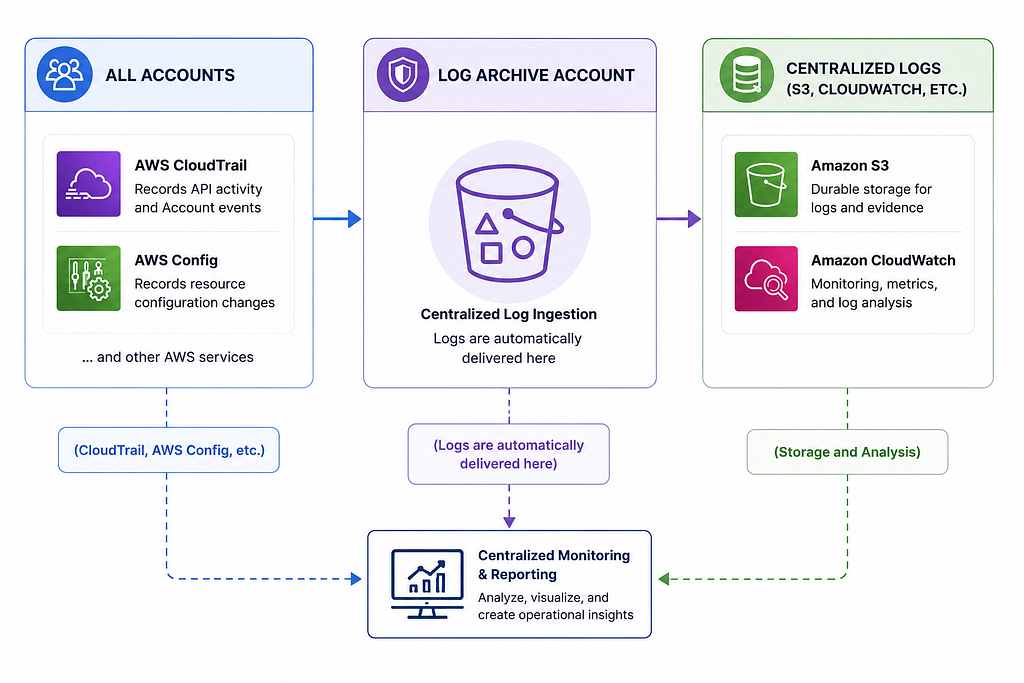
AWS CloudTrail, which records API activity, and AWS Config, which tracks changes to resource configurations, are automatically enabled in every enrolled account. Instead of storing their logs locally, they forward them directly to the Log Archive Account.
This approach provides several important benefits:
- Logs are centralized, eliminating the need to collect and manage them across multiple accounts.
- If an account is compromised, an attacker cannot delete or tamper with audit logs because they are stored in a separate account that the attacker cannot access.
- Auditing and compliance become much simpler. When working toward standards such as PCI DSS, NIST, or other regulatory frameworks, being able to demonstrate that your logs are centralized and protected from modification is a significant advantage.
In short, this architecture enables security teams to monitor the entire AWS environment from a single location, detect anomalies more effectively, and perform historical investigations whenever necessary.
5. Controls — The Heart of AWS Control Tower
You’ve set up your Landing Zone, organized your accounts, and centralized logging. But how do you keep the environment secure and prevent someone from making a mistake — whether accidental or intentional? In other words, who keeps everything under control?
This is where Controls come into play.
You can think of Controls as the pre-flight checklist used by an aircraft cabin crew — they are a set of rules that ensure everything is configured correctly and operating as expected before anything moves forward. AWS Control Tower provides more than 400 pre-built controls, grouped into three main categories.
Detective Controls
These controls do not prevent an action — they simply detect it. Behind the scenes, they rely on AWS Config and AWS Security Hub.
For example:
- Is MFA enabled for the root user?
- Is an Amazon S3 bucket publicly accessible?
- Is an Amazon RDS database exposed to the internet?
When a violation is detected, you’re notified, but the action itself is not blocked. Think of it as a fire alarm — it alerts you to the problem, but it doesn’t put out the fire.
Preventive Controls
These controls stop an action before it can occur. They are implemented using Service Control Policies (SCPs).
For example:
- An Amazon S3 bucket policy cannot be modified.
- Certain AWS services cannot be used.
- The root user is prevented from performing specific actions.
In this case, the action never happens — the door is already locked.
Proactive Controls
These are the most intelligent type of controls. They evaluate resources before they are provisioned, ensuring they comply with your organization’s security requirements. Behind the scenes, they use AWS CloudFormation Guard (Hooks).
For example:
- An unencrypted Amazon S3 bucket cannot be created.
- Any resource that does not comply with organizational standards is rejected before deployment.
You can think of this as stopping an aircraft on the runway before it ever takes off.
+----------------------+---------------------------------------------+--------------------------------------+
| Control Type         | What Does It Do?                            | Underlying Service                   |
+----------------------+---------------------------------------------+--------------------------------------+
| Detective Controls   | Detect and report non-compliant resources.  | AWS Config, AWS Security Hub         |
|                      | They do not prevent actions.                |                                      |
+----------------------+---------------------------------------------+--------------------------------------+
| Preventive Controls  | Block actions before they occur.            | Service Control Policies (SCPs)      |
+----------------------+---------------------------------------------+--------------------------------------+
| Proactive Controls   | Reject non-compliant resources before       | AWS CloudFormation Guard             |
|                      | they are provisioned.                       | (CloudFormation Hooks)               |
+----------------------+---------------------------------------------+--------------------------------------+
6. Control Categories
Now that we’ve covered the different types of controls (Detective, Preventive, and Proactive), let’s look at how AWS Control Tower classifies controls based on their enforcement level.
With more than 400 available controls, enabling every single one by default would be neither practical nor necessary. To address this, AWS groups controls into three categories:
Mandatory
These controls are automatically enabled as soon as you deploy your Landing Zone, and they cannot be disabled. There are currently around 23 mandatory controls. They form the foundation of your AWS environment’s security and represent the non-negotiable baseline.
Examples:
- AWS CloudTrail must always remain enabled.
- AWS Config must remain enabled and cannot be modified or disabled.
Strongly Recommended
These are AWS best-practice controls that are disabled by default. You can enable or disable them depending on your organization’s security requirements.
Examples:
- Prevent the creation of Root Access Keys.
- Detect publicly accessible Amazon RDS instances.
- Detect publicly accessible Amazon S3 buckets.
Elective
These controls are entirely optional and provide an additional layer of security. They are also disabled by default and can be enabled or disabled based on your organization’s needs.
Examples:
- Require MFA for IAM users.
- Enforce Amazon S3 Versioning.
- Prevent changes to Amazon S3 bucket policies.
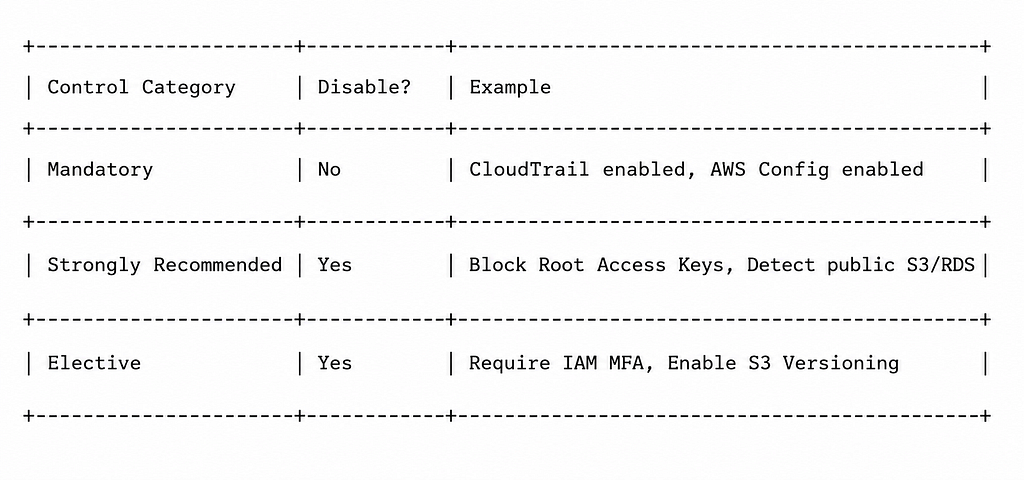
In practice, a good approach is to leave the Mandatory controls as they are — you can’t disable them anyway. For the Strongly Recommended category, however, it generally makes sense to enable most of them, as they reflect AWS best practices based on real-world operational experience.
Elective controls should be enabled selectively, depending on the sensitivity of your environment. For example, if you’re managing a production account that stores financial or other highly sensitive data, enabling additional elective controls can provide an extra layer of security.
7. How to Find Controls?
It’s easy to get lost among more than 400 controls. Fortunately, AWS provides three different approaches to help you filter controls based on your needs.
By Control Objective
You can select a specific security objective and view all controls that support that objective in one place.
Example: When you select the “Logging & Monitoring” objective, all controls related to logging and monitoring are listed.
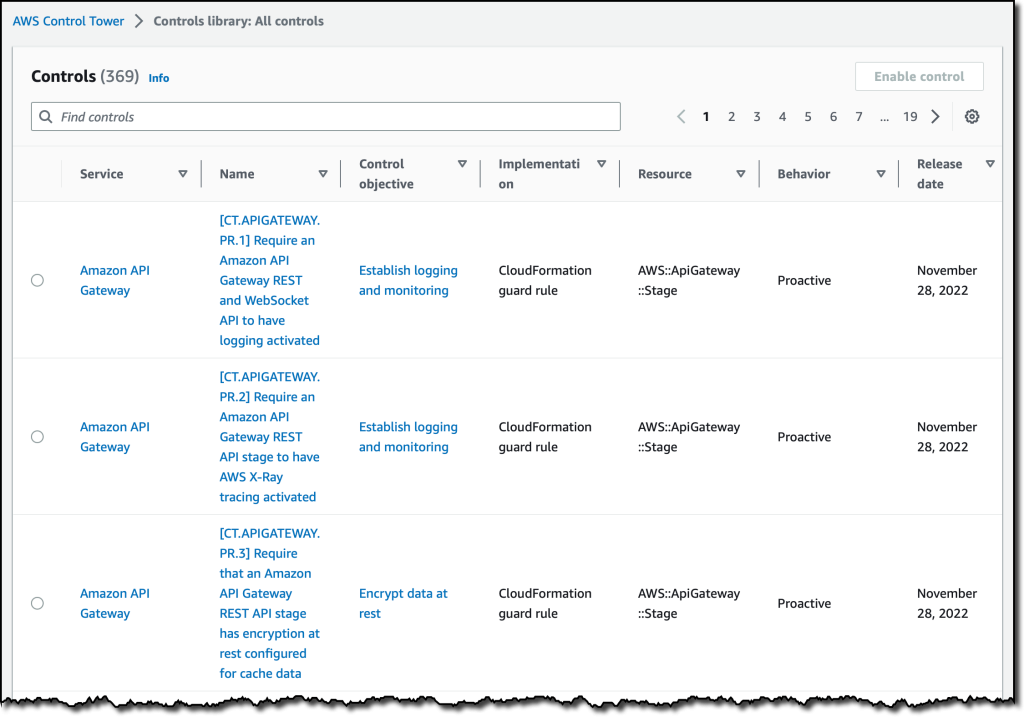
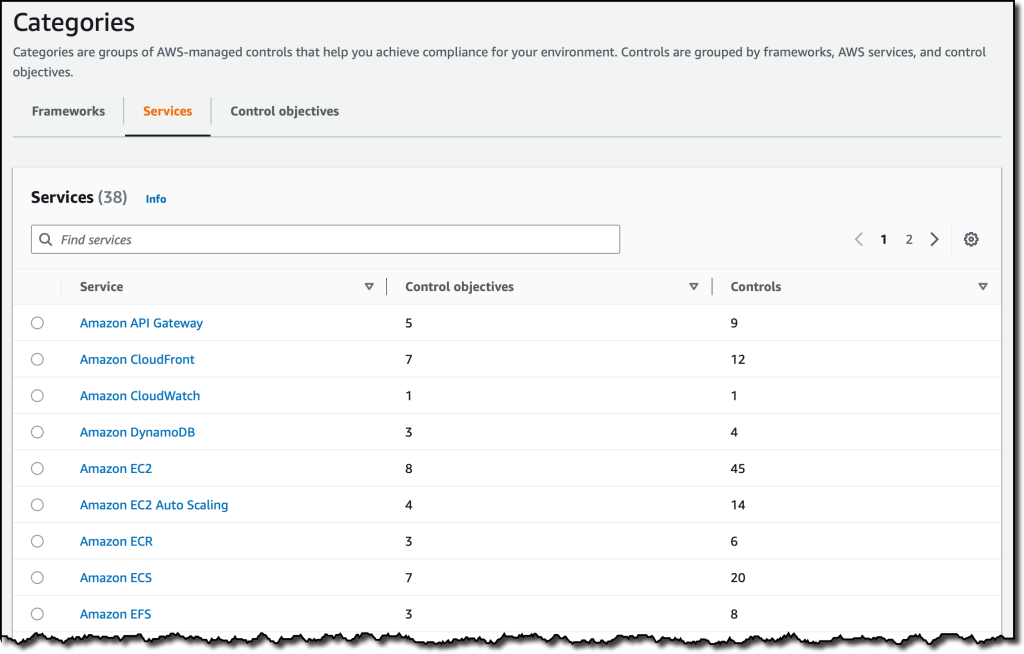
AWS Service
You can view all controls related to a specific AWS service.
Example: When you select “Amazon S3”, all service-specific controls are displayed, such as whether SSL is enforced, whether versioning is enabled, and whether a lifecycle policy is configured.
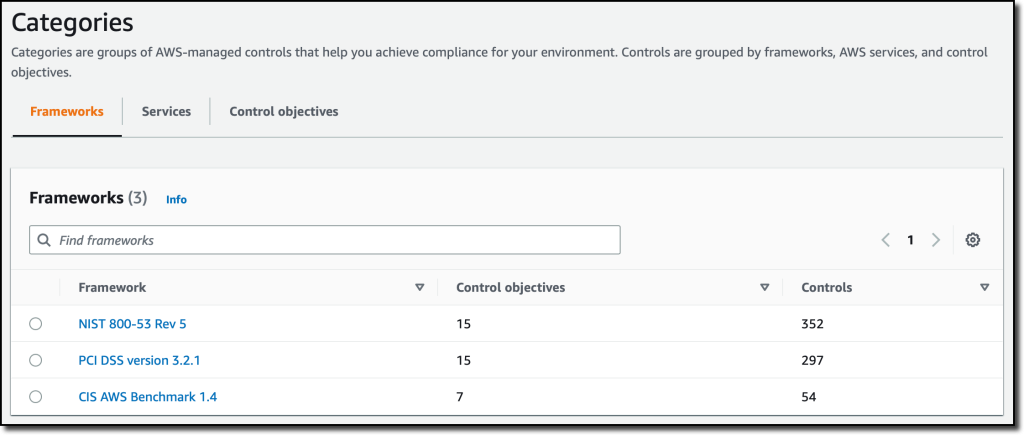
Compliance Framework
You can filter controls based on a specific compliance framework.
Example: When you select a framework such as PCI DSS, NIST 800–53, or CIS AWS Foundations, the controls required for compliance with that framework are automatically listed.
8. Critical Warnings and Best Practice Checklist
After setting up your Landing Zone, here is a checklist of the most critical points you’ll encounter either before or after deployment. Reviewing this checklist after deployment (or at regular intervals) is a good habit.
☐ Do not manually modify resources created by Control Tower
Resources such as cross-account roles, SCPs, and log buckets are managed by Control Tower. Manually changing or deleting them can cause drift, which may prevent Control Tower from functioning properly — it may no longer be able to apply new controls or enroll new accounts. Make changes only through the Control Tower console/API.
☐ Apply controls at the OU level instead of the account level
A control applied to an OU is automatically inherited by all existing and future accounts added to that OU. When you create a new account, you won’t have to apply controls one by one.
☐ Keep Dev / Test / Prod environments in separate accounts
This is not just for organization — it is a real security boundary. The most effective way to keep the blast radius of a mistake small is to isolate environments into separate accounts.
☐ Review the Strongly Recommended controls and enable most of them
Just because they are disabled by default does not mean they are unimportant — these are recommendations distilled from AWS’s real-world operational experience. Be sure to review them during a new deployment.
☐ Choose Elective controls based on your environment’s sensitivity
Instead of enabling everything, evaluate controls according to your environment. For example, for a production account that stores financial data, pay particular attention to controls such as MFA and versioning.
☐ Review controls periodically (e.g., quarterly)
AWS continuously adds new controls and updates existing ones. Rather than configuring them once and forgetting about them, review them on a regular basis.
☐ Keep access to the Log Archive and Audit accounts tightly restricted
These accounts are the “vault” of your environment. Keep the number of people with access to them to a minimum, and regularly review who has access.
These are just a few of the prominent best practice approaches. In reality, there are many more perspectives to consider, hundreds of controls to implement, and numerous systems to monitor across this vast ecosystem. As your environment and projects grow, so does the number of things that need to be managed.
This ecosystem becomes one of our greatest allies in many areas. Services like AWS Control Tower make it much easier to manage this complexity and consistently apply security standards. However, one thing should never be forgotten: automation is a powerful tool, but the control is always in our hands.
I hope you enjoy reading this article and find it useful :)
Happy flying, everyone🙌