My Dear Bucket: Locking Down Your Secrets Before Someone Else Finds Them, Data Protection Part-1

If you’ve been following this series, you already know where this is heading. No fluff, no marketing slides, just the notes I’m actually taking as I climb toward that Security Specialist badge, one domain at a time.
This time, we’re diving into Data Protection, one of the heaviest domains on the road. There’s too much ground to cover in one sitting, so I’m splitting it into two parts. Part 1 covers S3 authorization, S3 encryption (server-side and client-side), and Amazon Macie. Part 2 will tackle KMS internals, CloudHSM, Secrets Manager, and Certificate Manager.
Let’s get into it 🙌
S3 Authorization: Bucket Policies vs. ACLs
S3 has its own authorization layer, separate from IAM, and it comes in two flavors:
Bucket Policies: JSON documents, structurally almost identical to IAM policies, except for one crucial difference. They introduce a Principal element. Since a bucket policy isn’t attached to a user or role, it needs to explicitly state who it’s talking about. Bucket policies apply to the entire bucket (and everything in it), and they support Conditions, think IP restrictions, MFA requirements, that kind of fine-grained control.
ACLs (Access Control Lists): the older, blunter instrument. No JSON, no conditions, no explicit deny. You’re choosing permissions for one of four predefined grantees:
- Bucket Owner: full control, always
- Everyone: public access (signed or unsigned)
- Authenticated Users: any signed-in AWS identity, from any account
- S3 Log Delivery Group: used when the bucket stores access logs
The key distinction that trips people up: at the bucket level, ACLs support List and Write. At the object level, there’s no Write permission at all, only Read Object and Read/Write on the object’s ACL itself.
In practice: an object ACL lets you control who can read that object, but you can’t use it to overwrite the object’s content only a bucket policy or IAM can grant that.
The Conflict Rule: How AWS Decides Who Wins
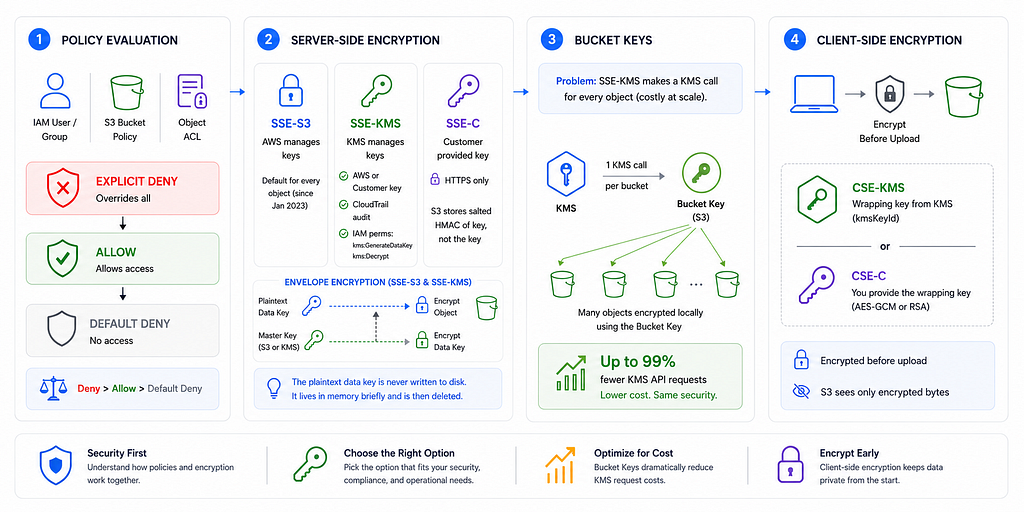
Here’s the scenario that shows up constantly on the exam: a principal is in an IAM group, the bucket has a policy, and there’s also an object ACL. Three potential rule sets, and they might contradict each other. So who wins?
AWS resolves this with one clean rule:
By default, everything is denied. An Allow somewhere (IAM, bucket policy, or ACL) is required to get in. But if there’s a single explicit Deny anywhere in the chain, it overrides every Allow, no matter how many Allows exist.
Memorize this sequence: Deny > Allow > Default Deny. This exact logic reappears everywhere in AWS: IAM, KMS key policies, SCPs, so nailing it here pays off across the whole exam.
S3 Server-Side Encryption: SSE-S3, SSE-KMS, SSE-C
Same destination, three very different roads to get there.
SSE-S3: the “just upload it” option. AWS generates and rotates the keys, you do nothing. Since January 2023, this is the default for every object uploaded to S3, encrypted or not by explicit request.
SSE-KMS: hands the key management to KMS instead of S3 internally. This buys you:
- A choice between an AWS-managed KMS key or a customer-managed one (full control: rotation, disabling, key policies)
- Full audit trail via CloudTrail
- Two IAM permissions you’ll need: kms:GenerateDataKey (to encrypt) and kms:Decrypt (to decrypt)
SSE-C: you bring your own key. The catch: it only works over HTTPS. Send it over plain HTTP, and S3 rejects the request outright. S3 stores a salted HMAC of your key for validation, but never stores the key itself.
The underlying mechanic behind SSE-S3 and SSE-KMS is the same envelope encryption pattern: a plaintext data key does the actual encrypting of your object, and that plaintext key is itself encrypted by a master key (S3’s own, or KMS’s). The plaintext version is never written to disk, it lives in memory just long enough to do its job, then it’s gone.
Bucket Keys: The Cost-Saving Trick Nobody Talks About
Every KMS API call has a price tag. Bucket Keys make that bill disappear.
Here’s a problem SSE-KMS creates that nobody mentions upfront: every single object encryption or decryption call means a round trip to KMS. At scale, millions of objects, that’s a lot of billable API calls.
Bucket Keys fix this. Instead of requesting a fresh data key from KMS for every object, S3 requests one bucket-level key from KMS, then generates data keys locally using that bucket key for every subsequent object. The result: up to a 99% reduction in KMS request costs, with zero change to your actual security posture. This is one of those “expensive to not know” facts for real-world AWS bills, not just the exam.
Client-Side Encryption: CSE-KMS & CSE-C
By the time your data reaches S3, it’s already unreadable, and S3 doesn’t even know it.
Sometimes the requirement isn’t “encrypt it in S3,” it’s “encrypt it before it leaves my laptop/server.” That’s client-side encryption (CSE), handled via the S3 Encryption Client.
The core concept here is envelope encryption, and it’s worth internalizing because KMS, SSE, and CSE all lean on it:
- A unique plaintext data key is generated and used to encrypt your object
- That data key gets wrapped (encrypted) by a wrapping key
- The plaintext data key is deleted from memory
- Both the encrypted object and the encrypted data key are uploaded to S3
Two flavors of wrapping key:
- CSE-KMS: wrapping key comes from KMS (kmsKeyId parameter)
- CSE-C: you supply your own wrapping key, and it must be a raw AES-GCM or RSA key
The critical takeaway: S3 has zero visibility into client-side encrypted objects. To S3, it’s just bytes. This matters a lot once Macie enters the picture: Macie scans object content for sensitive data, and if that content was client-side encrypted before upload, Macie only sees ciphertext, it can’t flag anything inside. Keep reading.
Amazon Macie: Your Automated Data Privacy Detective
You could write a script to grep for credit card numbers across every S3 bucket in your org. Or you could let Macie do it properly.
Macie is a managed ML and pattern-matching service that scans your S3 buckets for PII, financial data, credentials, and other sensitive content, and flags security misconfigurations along the way.
Bucket-level monitoring: Macie watches for five specific finding types:
- S3 bucket public access disabled
- S3 bucket encryption disabled
- S3 bucket public
- S3 bucket replicated externally
- S3 bucket shared externally
The last two look similar but aren’t: replicated externally means S3 replication rules are sending objects to a bucket outside your AWS account or org, while shared externally means bucket policy or ACL grants access to a principal outside your account, no replication involved.
One nuance that’s easy to miss: Macie only flags changes that happen after it’s enabled. If your bucket had encryption disabled before you turned Macie on, it won’t retroactively flag that. Findings stick around for 90 days and surface in the Macie console, via API, EventBridge, or Security Hub.
Sensitive Data Discovery Jobs: the deeper scan. These jobs hunt for financial info, PII, national IDs, medical data, and credentials, using either AWS’s built-in managed data identifiers or your own custom identifiers (written as regex). Jobs can run once, or on a daily/weekly/monthly schedule.
Here’s the part that ties directly back to the encryption section above. Macie’s ability to actually read your data depends entirely on how it’s encrypted:
Encryption Type / Can Macie Analyze It?
- SSE-S3: Yes, no issue
- SSE-KMS (AWS-managed key): Yes, no issue
- SSE-KMS (customer-managed key): Only if you explicitly grant Macie access via the key policy
- SSE-C: No, metadata only
- Client-side encryption: No, metadata only
Makes sense once you think about it: if Macie can’t get the key, it can’t decrypt, and if it can’t decrypt, all it can do is note that something is there.
Cost works on three axes: a flat $0.10 per bucket per month for evaluation, $0.01 per 100,000 objects per month if automated discovery is monitoring your object inventory, and a sliding scale starting at $1/GB for the first 50,000 GB/month on discovery jobs. That middle number is easy to overlook since it’s not about scanning content, just counting objects, but if you’re running a data lake or a centralized log bucket with hundreds of millions of small files, it can quietly outgrow the other two combined. Scan a terabyte a week, and you’re looking at roughly $4,000/month, not trivial, but a lot cheaper than a breach headline.
If there’s one thread running through all of this, it’s that encryption method choice isn’t just a security decision, it’s an operational one. SSE-C locks out Macie. Customer-managed KMS keys need explicit sharing. Bucket Keys quietly save you thousands of dollars. None of this is obvious until you’ve seen it laid out end to end.
To be contiuned…
In Part 2, we go deeper into the machinery behind all of this: how KMS actually structures its keys, when CloudHSM earns its (considerable) price tag over KMS, how Secrets Manager handles cross-account sharing, and how Certificate Manager quietly saves you from expired-cert outages.
See you in Part 2.
References
- Bucket policies for Amazon S3
- Access control in Amazon S3
- Protecting data with encryption
- Using server-side encryption with Amazon S3 managed keys (SSE-S3)
- Using server-side encryption with AWS KMS keys (SSE-KMS)
- Using server-side encryption with customer-provided keys (SSE-C)
- Reducing the cost of SSE-KMS with Amazon S3 Bucket Keys
- Protecting data by using client-side encryption
- What is Amazon Macie?
- Using managed data identifiers
- Amazon Macie pricing
- AWS Certified Security — Specialty (SCS-C03) Certification Preparation
If this write-up helped, consider sharing it or exploring more of the log.